Search Your Drive.
Analyze with AI.
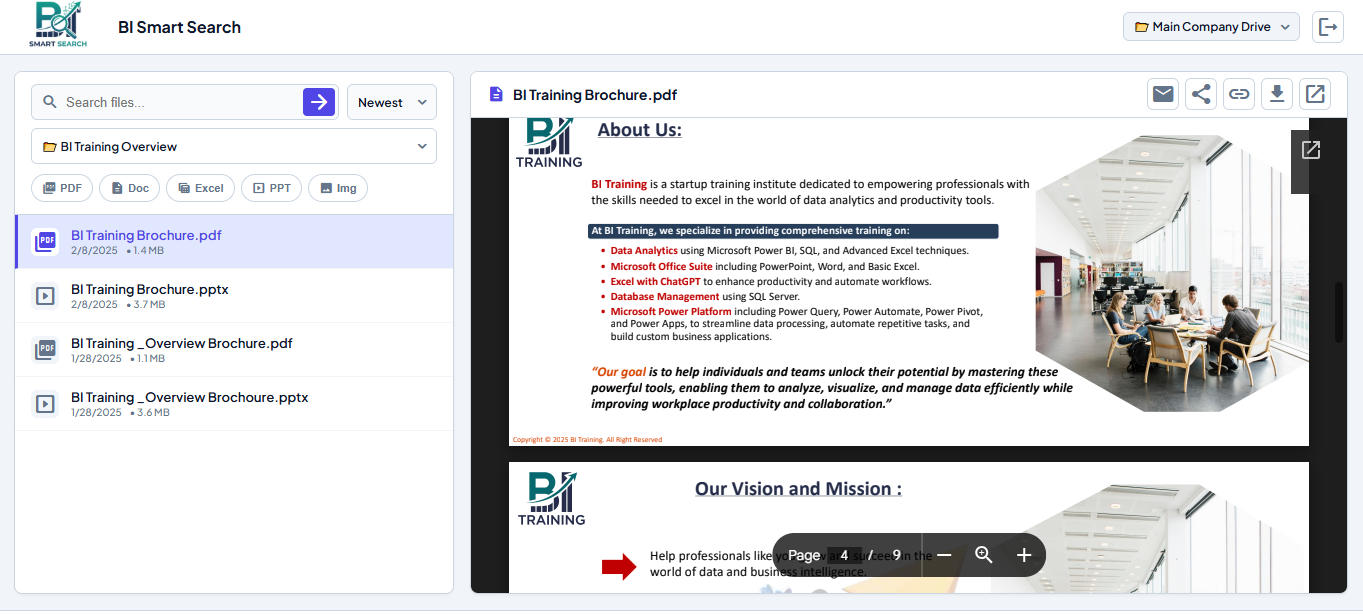
BI Smart Search instantly locates your Google Drive files, generates read-only previews, and builds real-time visual dashboards and summaries using enterprise-grade Smart AI.
100% Read-Only
Zero modifications to files.
No Data Storage
Processed in real-time only.
Private AI Engine
Never used to train public models.
Core Capabilities
Designed for speed, security, and simplicity without compromising your Google Drive’s integrity.
Advanced Querying
Instantly locate specific keywords across thousands of rows in your Google Sheets and Drive documents.
Live Read-Only Preview
Preview document contents directly within the app’s secure interface. No need to download files locally.
Zero Data Modification
Built with privacy-first architecture. Our application cannot and will not edit, delete, or save your organizational data.
Smart AI Insights
Click any document to instantly generate visual dashboards, executive summaries, and chat with your file in real-time.
The Ultimate Advantage for Data-Driven Teams
Designed specifically for organizations that manage large volumes of data on Google Drive, BI Smart Search bridges the gap between raw data storage and instant accessibility.
- Automated AI Analysis
- Boosts Employee Productivity
- Eliminates Data Silos
- Real-time Workspace Sync
How It Works
Connect Folder
Simply paste your Google Drive folder link into the application dashboard.
Authorize Access
Grant Google secure Read-Only permissions to allow the app to scan your files.
Search & Analyze
Type your query, view live previews, and click ‘Smart AI’ for instant visual insights.
Simple, Transparent Pricing
Choose the plan that fits your team. Save big with our limited 3-Year License.
Starter
Billed Monthly
- Up to 5 Team Members
- Unlimited Standard Searches
- Connect up to 3 Folders
- Secure Read-Only Access
- Standard Email Support
Pro Plan
Billed Monthly
- Up to 15 Team Members
- Smart AI Insights & Chat
- Connect Unlimited Folders
- Advanced Live Previews
- Admin Dashboard & Logs
Enterprise
Tailored for large organizations
- Unlimited Team Members
- Enterprise AI Integrations
- Dedicated Account Manager
- Personalized Onboarding
- Custom Invoice Terms
Frequently Asked Questions
Ready to streamline your workflow?
Join BI Training and access your files smarter, faster, and more securely.
Access BI Smart Search Now